
After the refill I had a library I trusted and no easy way to watch it. The numbers lived in run logs, Markdown reports and SQL queries I ran by hand. So I specified three dashboards for the admin area of InfiniteGrammar.de, built the data layer behind them, and built the frontend dashboards on top to support decision-making.
The brief I gave myself was short: three questions, one dashboard each, and every number answerable without opening a terminal.
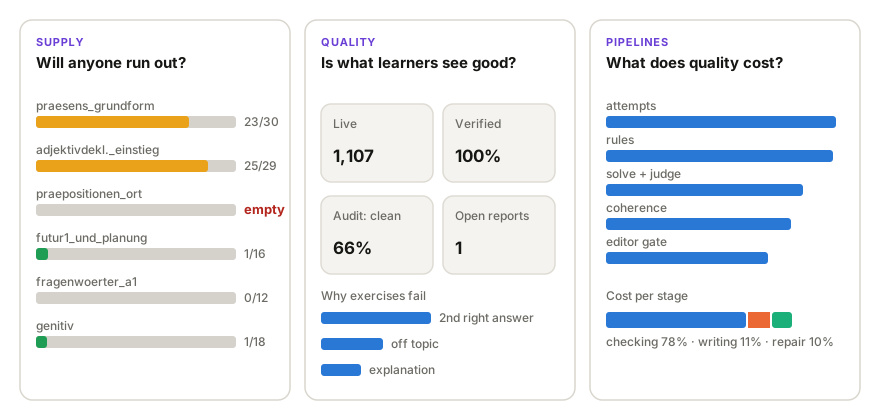
Supply: will anyone run out?
The product promises practice that doesn’t run out on one narrow topic. That promise breaks the moment any single learner reaches the end of a section, even if the average learner is nowhere near it. So the supply view shows no averages. Each section is one bar. Its full length is the number of live exercises. The filled part is how many the most advanced learner has already done, and the colour turns amber, then red, as that learner nears the end.
Quality: is what learners see good?
Live exercises are split by their latest check. Removed exercises are split by why they were removed. That second part nearly went wrong.
The existing admin tab listed every deactivated exercise as a learner report, with a reactivate button next to it. Pipeline rejections, and the takedown of 696 exercises I was about to run, would all have appeared there as complaints from learners. So before running the takedown I added a field that records why an exercise is inactive: learner report, admin decision, rejected at generation, live-audit takedown, or one of the old checkers. The takedown and the refill wrote it from the start, and a backfill labelled the 1,683 exercises that were already inactive.
Failure reasons are stored as short issue codes, and the views translate them into plain labels such as “second correct answer” or “final gate: double error”. The rule for the interface is to show labels, never codes. Nobody outside the project should need to know what “G2” means.
Pipelines: what does quality cost?
Every production run, live audit and experiment is a row with its funnel, its cost per stage and model, and its yield per level. A scoreboard lists every generator configuration I have tested, the pipeline versions from V1 to V6 and the variants that lost, with yield, cost per accepted and per clean exercise, audit grades, and the ID of the decision that adopted or rejected it. When I wonder whether an idea has already been tried, that is where I look first. The backfill loaded 37 past runs from their saved results.
Pipeline versions: what V1–V6 mean
- V1Original pipelineuntil Sep 2026
One model writes each exercise and reviews its own work. A draft that fails the review is rewritten from scratch until it passes or runs out of attempts. A separate checker pass flags problems afterwards.
- V2Generate, verify, repair28 Sep 2026
A mid-sized model (gpt-5.6-terra) writes. A new verifier checks every gap: free format rules, two small solvers that must agree on the one right answer, a judge for the German, the topic and the explanations, and an adjudicator when the solvers disagree. Only the gaps that fail are repaired, at most twice.
- V3+ coherence check30 Sep 2026
After every gap passes, a separate check reads the whole text: who does what, who a pronoun points to, whether facts contradict each other. A failure gets one text-only repair and a full re-check.
- V4+ design rules in the prompt2 Oct 2026
The rules for good wrong answers move from the checks into the writing prompt: each distractor is wrong in one way only, inside the grammar being practised, and no exercise can be solved by a surface pattern.
- V5+ stronger writer, editor gate3 Oct 2026
A frontier model (gpt-6.1-sol) writes and repairs. The same model then reads every finished exercise like a senior editor and rejects it for any of six named issue types: a second right answer, a double error, an option nobody would choose, a wrong key or explanation, a text problem, or mixed grammar.
- V6+ mixed-grammar tolerance4 Oct 2026
Up to 30% of an exercise’s gaps may touch a neighbouring grammar point, and a fixed phrase counts as one choice. A surface pattern across the whole exercise is still fatal. This is the version in production today.
Each version keeps everything before it. Charts and text name the version that produced a number.
The definition that mattered most
The first build of the quality tab showed “Verified: 0%”. The real figure was 100%: every live exercise had passed the current checks.
The 0% came from a rule that sounds reasonable. You choose which checkers to count, all of them or just one, and each exercise takes the verdict of the most recent check among them. Passed means verified, failed means failed, no verdict means not checked. It’s the rule most people would sketch on a whiteboard.
It broke for two reasons. First, it only works if every checker records its passes as well as its failures. The old checkers only logged what they flagged, and the current pipeline stores its verdict on the exercise itself, so the dashboard found no verdict for almost any live exercise. Second, and more important, introducing a new version of the generation pipeline doesn’t always mean re-checking all the existing exercises. Because the latest checker versions proved to perform well, and the whole exercise base had been checked with them, the dashboard’s default became “All verifiers”: an exercise counts as verified when at least one verifier has approved it. You can see which verifier approved each exercise, and narrow the view to a single verifier.
If you’re building dashboards for an AI product
- Give each dashboard one question, starting from the decision it supports.
- If you promise users “enough”, measure supply against your most engaged user, not the average one.
- Record why things happen when they happen. “Why is this inactive?” can’t be reconstructed later.
- Define every metric once, in the data layer, and write the definition in plain words.
- Ship the data contract before the charts.